Move an activity and let the chain follow
Free
A dependency means that one record waits for another: move the earlier one and everything that waits for it follows.
Get started
The animation moves Design the feature one week later. The build and test follow, keeping their durations, and the milestone moves too. Draft announcement has no dependency on the chain and keeps its dates. Select a bar to highlight its chain, or stop the story and drag the design bar yourself.
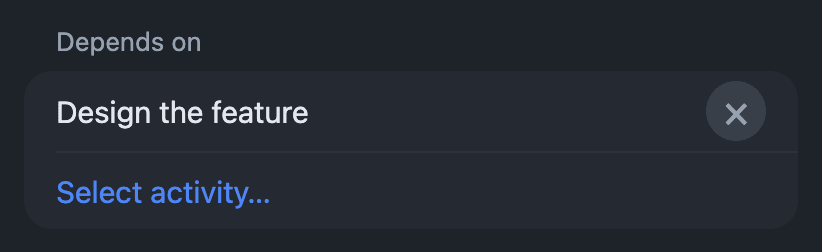
To add a relationship:
- Open Build the feature and, under Depends on, select Design the feature. Search by name or reference key; tick an option to select it. In List, edit the Depends on cell instead.
- Show dependency arrows in a custom timeline view.
- Drag the predecessor to another date and check the following work.
More things to do
Connect two activities by dragging
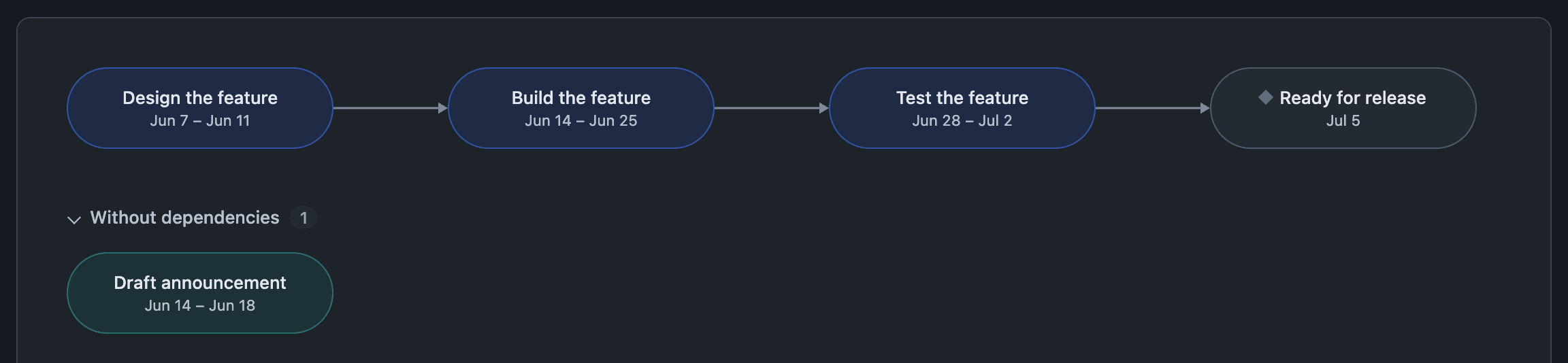
In Timeline, drag the body of an activity bar onto another bar in a different row, or onto a milestone; drag along its own row to change dates. In Flow, drag one activity or milestone onto another. Drop on the side that shows which should come first; the arrow points from the earlier activity to the one that waits.
Move an activity with a successor
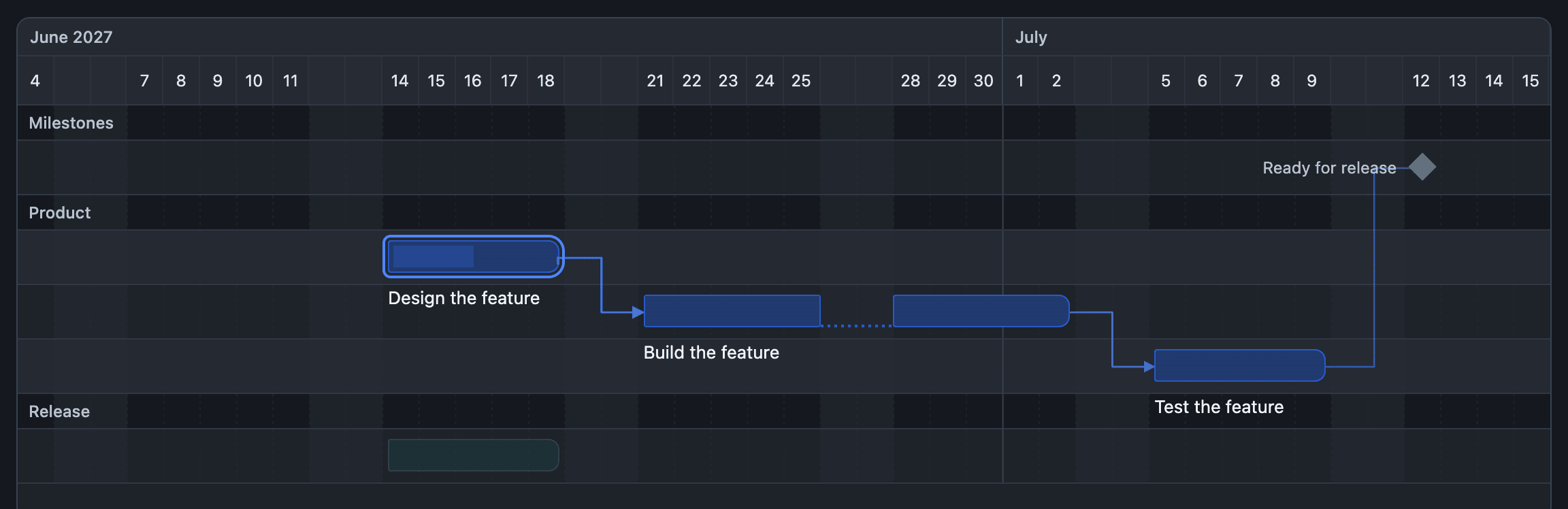
Drag the body of the earlier bar, such as Design the feature, a few days along its row and release it. A successor scheduled to start as soon as it ends moves with it, and both keep their durations.
Make an activity longer
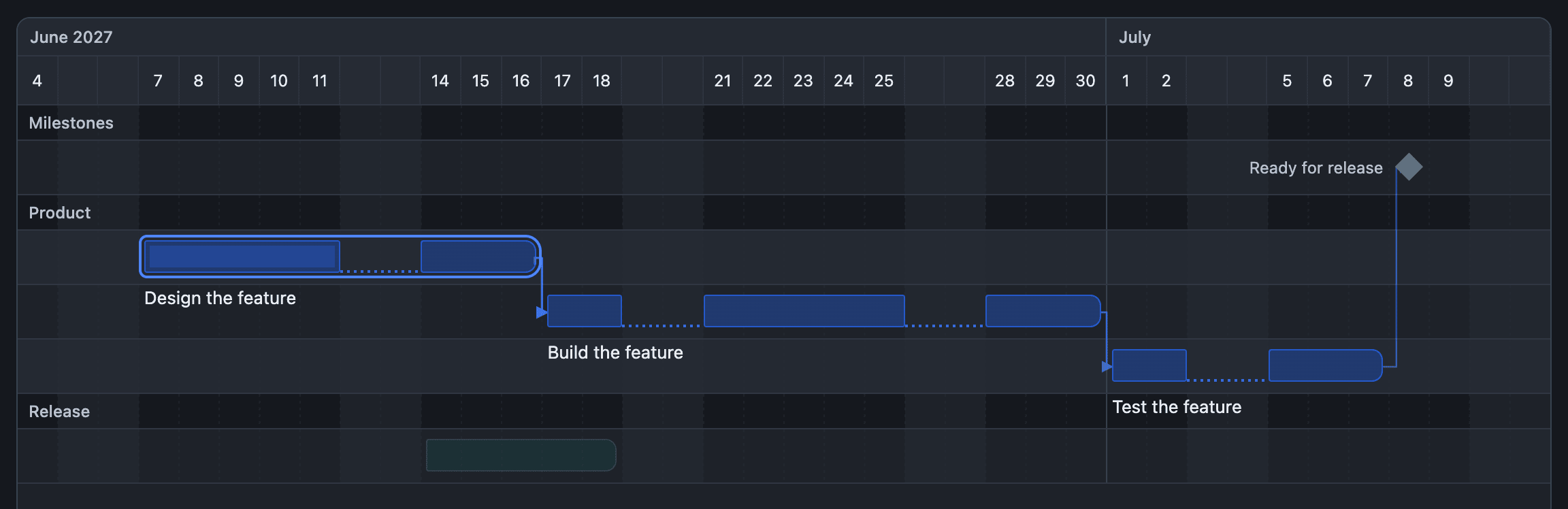
Drag the right edge of the bar to the right. The start stays and the end moves later; a successor that starts when the activity finishes follows the new end.
Let work overlap
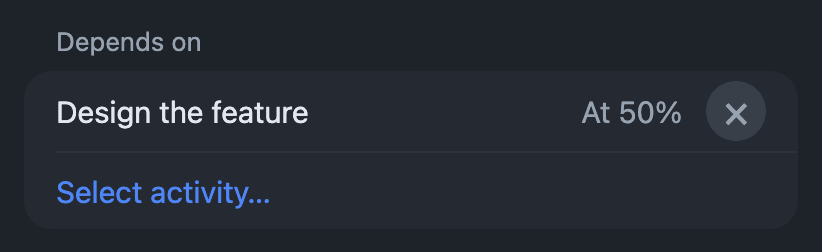
Next to each activity it waits for, choose when the activity may start: after the end, at 75%, 50% or 25%, or at its start. Right-clicking an arrow offers the same choices.
How it works
A relationship sets an earliest start
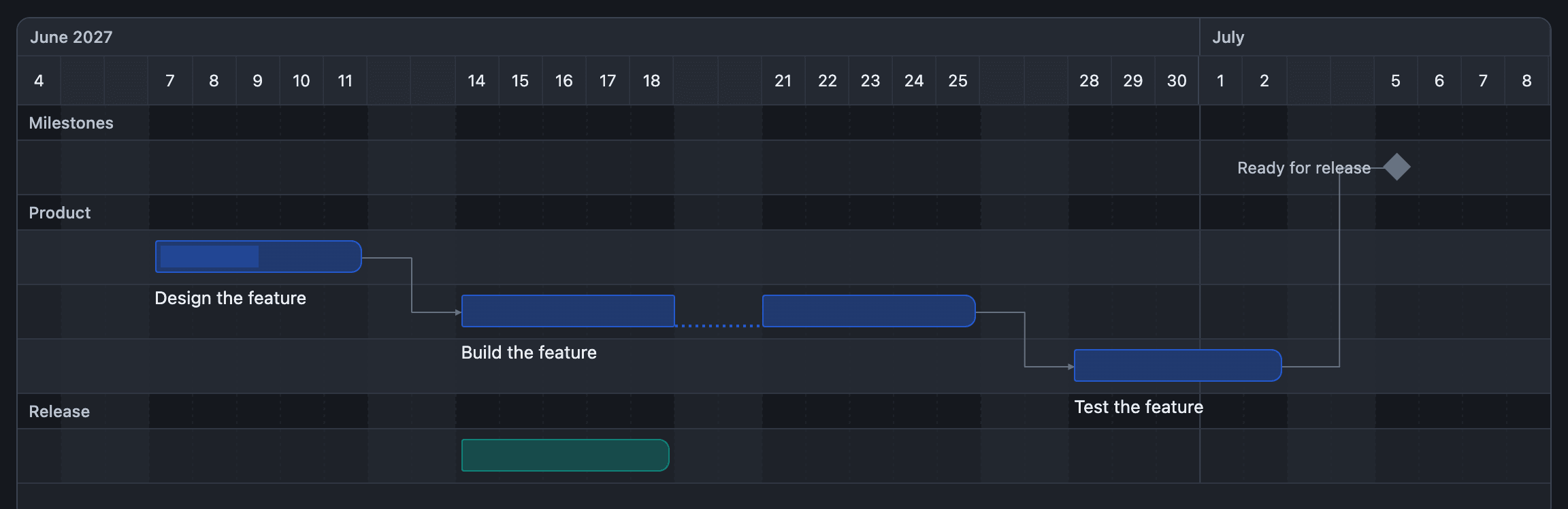
With After it ends, a successor may start on the day after its predecessor ends. In this example, design ends on Friday June 11 and build starts on Monday June 14 because the roadmap excludes weekends. In calendar-day planning, Saturday June 12 would be allowed. Dates include both the first and last day: Monday to Friday is five days of work here.
The roadmap uses work-day planning, so a move keeps the same number of work days between activities, and a one-week move here retains the same weekdays. A vacation can make the resulting bars occupy more calendar time; see Planning around vacation.
A successor can start later than its earliest allowed date. This leaves room for a deliberate handover or waiting period. Moving a predecessor carries its successors earlier or later, preserving their durations and the spacing in the plan's calendar, then checking that every dependency is still satisfied. Resizing a predecessor can move the chain too. Dragging a whole bar preserves its duration; changing one end changes its duration.
Moving build does not move design. Moving design does not move the independent announcement. A team, phase, filter or hidden arrow does not create or remove a dependency. Filtering design out of a view leaves its constraint on build active. Dates and relationships belong to the plan; whether arrows are visible belongs to the view. Two activities in the same team or phase do not automatically wait for each other.
For activities with clock times, and dependencies between whole-day and timed work, see Clock times and agendas. Clock successors may start at the displayed finish; whole-day successors round up to midnight, then apply the work calendar.
Several predecessors must all allow the start
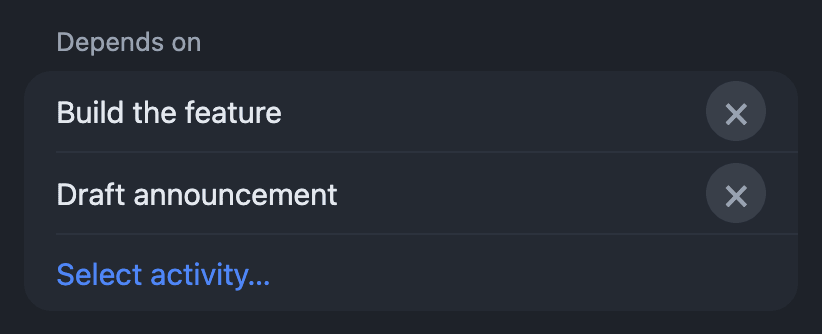
If build waits for both design and another activity, both relationships apply. The latest allowed start is the lower bound. When several predecessors move, Tidigar uses the change that puts the successor furthest forward, then checks all its start limits. It does not add the shifts together or promise that every earlier move can pull work earlier: another predecessor may still hold it back.
Adding a dependency pushes a successor later if its current start is too early. If it already starts late enough, its gap can remain. Removing a dependency leaves the current dates in place; it does not undo earlier scheduling moves.
Percentages describe planned time, not reported completion
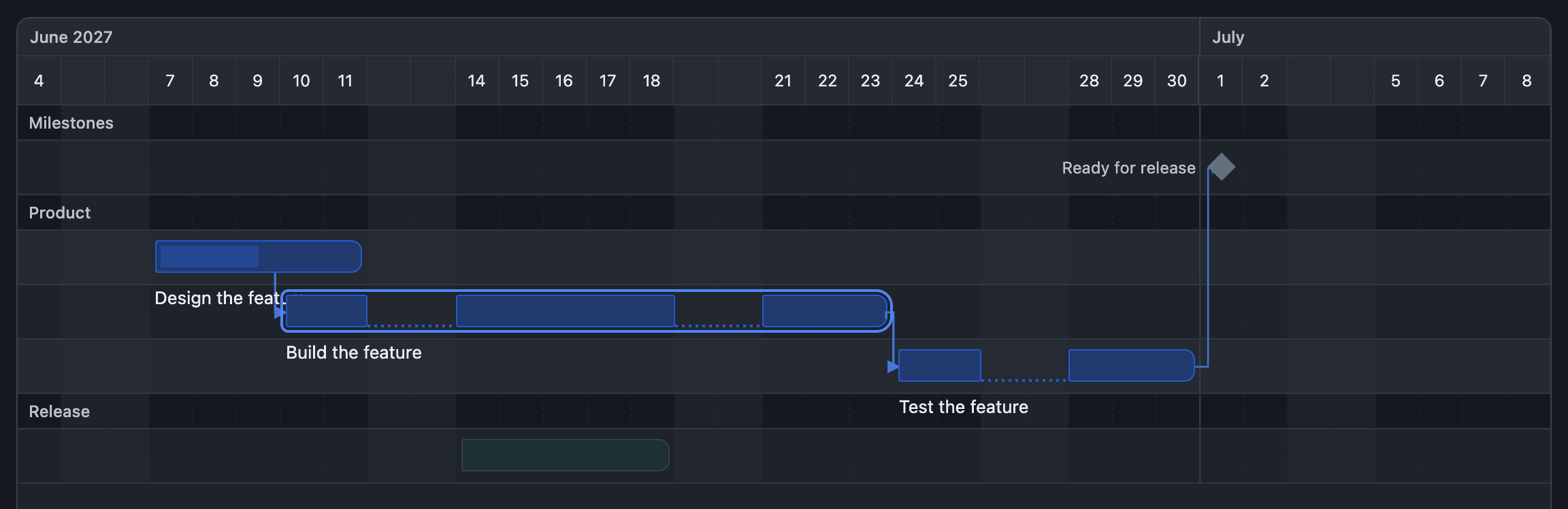
The overlap choices are At its start, At 25%, At 50%, At 75% and After it ends. For a five-work-day design starting Monday June 7, 50% is three work days, rounded up. Build may therefore start on Thursday June 10. At the start allows Monday June 7; after the end allows the next work day, Monday June 14.
The activity moves to the chosen point, and what waits for it moves along, earlier or later. Its arrow leaves the bar there, and it keeps following when the earlier activity moves or changes length. The share counts the earlier activity's days, rounded up, in work days when the roadmap plans in them.
These thresholds use the predecessor's scheduled duration. Changing its progress to 50% does not release a successor or move dates. Changing its dates can change the threshold even if progress stays the same. Work-day planning counts weekdays outside vacation periods; calendar-day planning counts every day.
Changing the overlap choice places the successor at the new threshold, subject to its other predecessors, and moves its following chain. This deliberate change can remove a gap that an ordinary bar move would preserve. To introduce overlap, change the relationship rather than dragging a successor before its allowed start. Partial thresholds apply to activity predecessors; a milestone has one date to wait for, and a period its end.
Checking Done needs each activity it waits for to have reached its share, and each milestone it waits for to be done. A period it waits for holds only its dates.
Compacting removes waiting time deliberately
Open the roadmap's Properties and choose Compact the plan when you want every dependent activity to start as early as all its relationships allow. It preserves activity durations and keeps independent activities on their dates. Following milestones move to the first allowed day after their latest predecessor, skipping non-working days in a work-day plan. Fixed milestones keep their dates.
Compacting applies to the whole plan, including work outside the current filter. It can remove intentional gaps, so review the result before using it for a team commitment. Removing a gap is a separate decision from moving one piece of work.
A relationship that would loop cannot be selected
The picker excludes the record itself and anything already waiting for it, directly or through a longer chain. Those choices would create a cycle with no valid scheduling order, and Tidigar also prevents circular dependency chains. An activity or a milestone may wait for any activity, milestone or period, such as a change freeze; a period waits for nothing. See Two kinds of milestone for milestones on both sides.
Imported dependencies must name records that exist and must not form cycles. If validation reports a missing predecessor or a cycle, correct the relationships in the source plan rather than changing dates to disguise it.
Limits and access
- Free, in the browser and in every Tidigar app.
- A scheduling change that would move work beyond Tidigar's supported end date, December 31, 2200, cannot be saved. Resolve the dates or relationship and try again.
- Progress never releases a successor; only the predecessor's dates and the chosen share do.
- Partial thresholds apply to activity predecessors only.
- Compacting applies to the whole plan, including work outside the current filter.
Related
- Two kinds of milestone: milestones that follow work or anchor a date.
- Planning around vacation: non-working days in a chain.
- Clock times and agendas: dependencies between whole-day and timed work.
- The critical line: a timeline paired with a synchronized flow view.